












Mangayomi is a free and open-source app inspired by Tachiyomi and developed with Flutter, which will allow you to download all the manga and anime you want directly to your hard drive. Although you can download any content you want to enjoy offline, you can also read manga or stream anime online.
Choose from hundreds of different sources
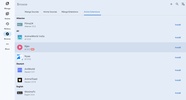
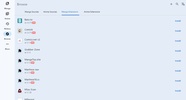
The first thing you need to do to start using Mangayomi is download some sources. You'll find hundreds of different sources, both for anime and manga, at your disposal. Some of these sources will allow you to access more language-specific content, so if you want to read manga in your native language, you can easily do so. All you have to do is download the source for the language you want. Similarly, you'll also find sources specializing in webtoons and anime.
A very easy way to download
After installing your favorite source, you can simply access it from the appropriate tab. From here, you can then download any manga or anime by simply clicking on the download button on the right of the screen. Any images of the manga you download will be saved in the corresponding folder on your hard drive. If you prefer, as mentioned above, you can also enjoy your favorite manga and anime directly from the app, without having to download anything. You decide how you want to use the program.
Customize the program to your liking
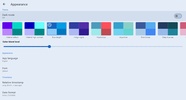
From the settings options menu, you can adjust some important aspects of Mangayomi, including the look and feel of the interface. The first thing you can do is choose the download directories you want to use. You can also choose the default format and quality for all of your downloads. And, of course, you'll have a lot of different options to choose from to configure the look and feel of the app interface. For example, you'll have over a dozen different color schemes at your disposal.
Download Mangayomi and enjoy a huge amount and variety of content, with thousands and thousands of mangas and animes at your disposal. Thanks to its simple and attractive interface, the app is very easy to use. Unlike other similar programs, it also takes up very little space on the hard drive, although its size is likely to increase as you download sources and content.


 2 reviews















Comments
Nice